OAuth & Identity
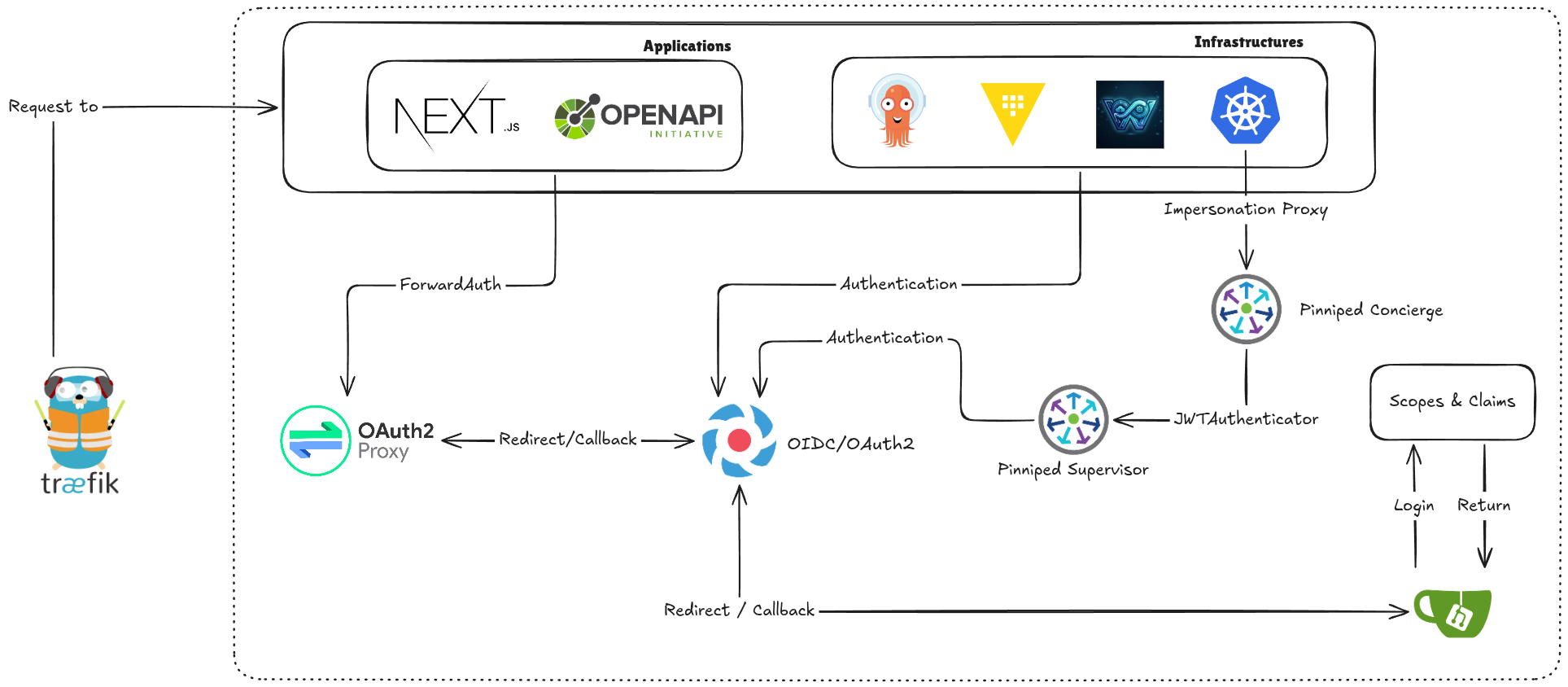
W'xOps uses a three-layer identity stack: Dex as the OIDC identity broker, Pinniped Supervisor as the Kubernetes-native SSO layer, and OAuth2/PKCE as the portal's own session mechanism. A single login gives the user access to the portal UI, the wxops CLI, and every registered spoke cluster — without sharing long-lived credentials.
Components
Dex IDP
Dex is an OpenID Connect identity provider that federates upstream identity sources — Gitea OAuth2, LDAP, GitHub, SAML — into a single OIDC endpoint consumed by Pinniped.
Pinniped Supervisor
Pinniped Supervisor is a Kubernetes-native OIDC server. It issues short-lived, cluster-scoped tokens that Concierge validates on each spoke cluster. Key CRs:
| CR | Purpose |
|---|---|
FederationDomain | OIDC issuer endpoint; maps upstream IDPs to display names |
OIDCIdentityProvider | Connects Supervisor to Dex (or any OIDC upstream) |
JWTAuthenticator | Installed on each spoke; validates Supervisor-issued tokens |
OAuth2 / PKCE in the Portal
The portal's Go backend implements an OAuth2 Authorization Code flow with PKCE against Pinniped Supervisor. No client secret is stored — the PKCE code_verifier is sufficient for public clients.
Login Flow
Full sequence diagram and login flow details to be added.
Gitea as the Upstream Identity Provider
Gitea OAuth2 app setup, group claims, and Dex connector config to be added.
Group Claims and RBAC
Gitea sends group membership claims in the format orgName:teamName (e.g. wxops:rocket-team). Pinniped passes these through as Kubernetes groups in the impersonation request.
The portal uses group membership to:
- Derive the user's tenant namespace (
tenant-{orgName}) - Gate lifecycle promotion (only
platform-teamor{team}:Managerscan promote to staging/production) - Scope cluster tab queries — never calling
GET /api/v1/namespacesfor tenant users
Configuration Reference
Environment variables for OIDC client ID, issuer URL, and redirect URI to be added.
CLI Authentication
The wxops login command triggers the same PKCE flow as the browser. After completion the token is stored in ~/.config/wxops/token and used for all subsequent CLI commands.