wxops CLI
wxops is a thin terminal client for the W'xOps Internal Developer Portal.
It talks to the same REST API and the same authentication model as the portal
UI — there is no separate credential system, no kubeconfig required, no direct
Gitea access needed.
What it's for
The CLI exists for three situations where opening a browser is inconvenient:
| Situation | Commands |
|---|---|
| Browse the catalog from the terminal — search entities, check lifecycle, inspect owners | wxops catalog list, wxops catalog get |
| Get the exact kubectl / mirrord commands for a service without reading Kubernetes resources yourself | wxops debug, wxops darlane status |
| Active file sync during inner-loop development — watch local files and stream changes into the Darlane debug pod | wxops darlane sync, wxops darlane push, wxops darlane restart |
The CLI never writes to Kubernetes directly. Darlane enable/disable, overlay
creation, and lifecycle promotion remain portal UI operations. The CLI's write
operations are limited to one action: wxops update replaces the CLI binary itself.
kubectl needed for catalog commandswxops catalog list and wxops debug derive the namespace, deployment name, and
port from the catalog entity — they do not call the Kubernetes API. You need
kubectl in your PATH only for darlane sync, darlane push, darlane logs,
darlane exec, darlane restart, and darlane port-forward.
Installation
The download endpoint is session-gated — it proxies the Gitea release binary through the portal using its own service-account token, so you never need direct Gitea access. But the proxy requires an active portal session.
Option A — Portal UI (recommended for first install)
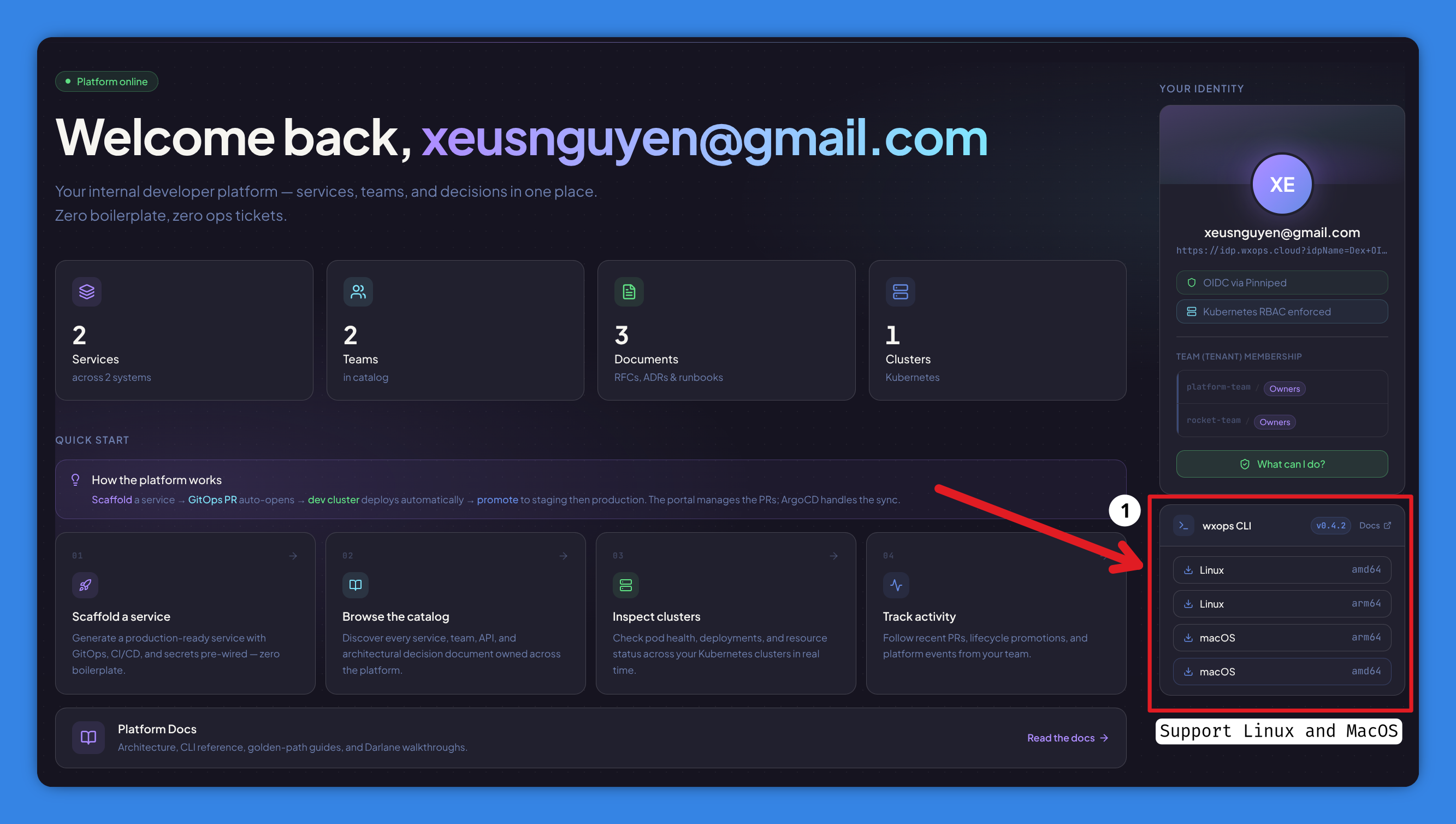
Log in to the portal in your browser, go to Overview → Download CLI, and click the button for your platform. The browser forwards your session cookie automatically.
Supported: linux-amd64, linux-arm64, darwin-amd64, darwin-arm64.
Option B — Gitea release page (platform team / direct Gitea access)
Download directly from the release assets in Gitea — no portal session needed.
Option C — Build from source
# From the repo root
make cli-build     # → cli/bin/wxops
make cli-install   # → GOPATH/bin/wxops

# Or from inside cli/
cd cli && make build
Version is stamped from the nearest git tag via -ldflags "-X main.version={tag}".
curl https://portal.example.com/api/v1/cli/download/linux-amd64 fails with
401. The download route sits behind the same RequireSession middleware as
every other portal API — no session cookie, no binary.
Authentication
# First-time login — portal URL is required
wxops login --portal https://portal.example.com

# Re-authenticate using the saved portal URL
wxops login
Opens the system browser to the portal's OIDC flow. After login, the session token
is saved to ~/.wxops/credentials.json:
{
  "portal_url": "https://portal.example.com",
  "token": "<wxops_session_value>"
}
The token is the same wxops_session cookie the browser uses. Run wxops login
again when it expires — there is no auto-refresh.
CI/CD environments — skip the browser flow with environment variables:
export WXOPS_PORTAL_URL=https://portal.example.com
export WXOPS_TOKEN=<token>
wxops catalog list --kind Component
WXOPS_TOKEN always takes precedence over the credentials file.
Version
wxops version
# wxops version v0.4.2
Update
wxops update          # prompts for confirmation
wxops update --yes    # skip confirmation (useful in scripts)
Checks the portal for the latest release, shows the current vs latest version, then downloads and atomically replaces the current binary. Uses the stored session token — no Gitea access needed. Requires an existing install (use Option A or B above for first install).
Catalog
Catalog commands read from the portal's /api/v1/catalog/entities endpoint — the
same data the UI shows. Useful for catalog exploration in scripts or terminals.
catalog list
wxops catalog list
wxops catalog list --kind Component
wxops catalog list --kind Component --lifecycle production
KIND        NAME              LIFECYCLE    OWNER                DESCRIPTION
----        ----              ---------    -----                -----------
Component   payment-api       production   wxops:rocket-team    Payment processing service
Component   auth-service      production   wxops:platform-team  Identity and token management
API         payment-api-v1    production   wxops:rocket-team    OpenAPI spec for payment-api
| Flag | Description |
|---|---|
--kind | Filter by kind: Component, API, Resource, Group, User, System |
--lifecycle | Filter by lifecycle: experimental, development, staging, production |
catalog get
# Both kind and name are required
wxops catalog get Component payment-api
wxops catalog get API payment-api-v1
Kind:        Component
Name:        payment-api
Title:       Payment API
Lifecycle:   production
Owner:       wxops:rocket-team
Type:        service
Description: Payment processing service
Source:      wxops/payment-api
Debug
wxops debug is the quickest way to get the right kubectl and mirrord commands
for a service. It reads the catalog entity to derive the namespace and port, checks
the Darlane status per environment, and prints ready-to-run commands.
No cluster API call required — namespace is derived from the owner group
(org:team → tenant-{org}), port from the wxops.cloud/container-port annotation.
wxops debug payment-api
wxops debug payment-api --env staging
| Flag | Short | Default | Description |
|---|---|---|---|
--env | -e | dev | Target environment: dev, staging, production |
Sample output:
Darlane debug  payment-api
Namespace       tenant-wxops
Deployment      payment-api-darlane
Lifecycle       production

Darlane status
  dev          ✓  enabled
  staging      ·  overlay exists — Darlane not enabled
  production   —  no overlay

Commands (dev)

  # Exec (bash)
  kubectl -n tenant-wxops exec -it deployment/payment-api-darlane -- bash

  # Port-forward
  kubectl -n tenant-wxops port-forward deployment/payment-api-darlane 8080:8080

  # Traffic mirror (mirrord)
  mirrord exec \
    --target deployment/payment-api-darlane \
    --target-namespace tenant-wxops \
    -- <your-start-command>

  # File sync — watch local files and stream changes into the pod
  wxops darlane sync payment-api
Darlane commands
The darlane subcommands handle the active inner-loop development workflow:
syncing local files into a Darlane pod, streaming logs, restarting, and checking
status. All commands resolve the namespace and deployment name from the catalog
entity — you don't need to know or remember the Kubernetes resource names.
Which tool for inner-loop work?
Darlane pods support two workflows. They are not redundant — pick by where your code needs to run:
| Mirrord | wxops darlane sync | |
|---|---|---|
| Code runs on | Your local machine | Inside the cluster pod |
| What it provides | Pod's network, env vars, secrets — tunnelled to your local process | Real-time file sync into the pod's writable volume |
| When to use | Step-debugging a real live request; workload needs Vault agent / Envoy / CNI to function | Workload has OS/arch/GPU dependencies that can't be reproduced locally |
| Hot reload | Your local toolchain (uvicorn --reload, air, nodemon) | The framework inside the pod handles it |
Both can be combined: darlane sync for continuous file sync + Mirrord for
intercepting a specific tricky request. They target the same debug pod.
darlane sync — watch and stream file changes
The primary inner-loop command. Watches local files with fsnotify, batches
changes under a debounce window, and streams them into the Darlane pod using
kubectl exec tar xf -. No daemon, no sidecar, no extra tooling required.
wxops darlane sync payment-api
wxops darlane sync payment-api --local ./src --remote /app/src
wxops darlane sync payment-api --exclude '*.log' --exclude 'tmp/'
wxops darlane sync payment-api --no-initial-sync
wxops darlane sync payment-api --tail-logs   # stream pod logs alongside sync events
Sample session:
  darlane sync
  ──────────────────────────────────────────────────
  component     python-demo
  env           dev
  namespace     tenant-rocket-team
  deployment    python-demo-darlane
  sync          ./app  →  /app

  pre-flight
  ✓  catalog entity found
  ✓  darlane enabled for "dev"
  ✓  project: python
  ✓  tar available in pod
  ──────────────────────────────────────────────────

→  initial sync: 12 file(s)
   tip: if the pod doesn't hot-reload, restart it:
        wxops darlane restart python-demo --local ./app --remote /app

↑  synced 1 file(s): app/main.py
↑  synced 2 file(s): app/handler.py, app/util.py
✗  deleted 1 file(s): app/legacy.py
⚠  pod not ready, retrying (1/3)…
↑  synced 1 file(s): app/main.py
^C
stopped.
Pre-flight checks run before the watcher starts:
| Check | On fail |
|---|---|
| Catalog entity found | Soft warn — watcher still starts |
| Overlay exists in gitops-infra | Soft warn |
darlaneEnabled: true in overlay | Soft warn |
--remote matches fileSync.mountPath | Soft warn + hint showing the configured path |
| Local project language matches catalog tags | Soft warn — check you are in the right directory |
tar available in the container image | Hard fail — prints kubectl debug -it <pod> --image=busybox command and exits |
Behavior:
- Initial sync — on startup all non-excluded local files are sent to the pod so the volume aligns with local state before incremental events begin. Skip with
--no-initial-syncwhen the pod is already seeded. - Delete propagation — locally deleted files are removed from the pod on the next flush via a single
kubectl exec rm -rf(each path is a separate argv, not a shell argument — no injection risk). - Max-debounce cap — if a burst (e.g.
go build) keeps resetting the debounce timer, a flush is forced at the 2-second mark to prevent starvation. - Retry — sync and delete are retried up to 3 times with a 2-second delay. The session survives a pod restart mid-session.
- Pod-replaced re-seed — if a retry succeeds after failures (pod was replaced), all local files are automatically re-seeded to the new pod. This fires regardless of
--no-initial-sync. - Graceful shutdown —
Ctrl-Cflushes any pending batch before exiting.
Built-in excludes (always skipped regardless of --exclude): .git, node_modules, __pycache__, .next, vendor.
| Flag | Short | Default | Description |
|---|---|---|---|
--env | -e | dev | Target environment: dev, staging, production |
--namespace | -n | (derived from entity owner) | Override K8s namespace |
--deployment | (derived) | Override deployment name | |
--local | . | Local directory to watch | |
--remote | /app | Remote path inside the container | |
--debounce | 100 | Debounce interval in milliseconds | |
--exclude | Glob pattern to exclude (repeatable) | ||
--no-initial-sync | false | Skip the initial full sync on startup | |
--tail-logs | false | Stream pod logs alongside file sync events |
darlane push — one-shot sync (no watcher)
Same pre-flight checks and file sync as darlane sync, but exits after the
initial sync completes. Useful in CI pipelines or as a pre-step before starting
a local dev server.
wxops darlane push payment-api
wxops darlane push payment-api --local ./src --remote /app/src
Accepts the same --env, --namespace, --deployment, --local, --remote,
--exclude flags as darlane sync. On success, prints the restart hint when
Darlane is enabled.
darlane status — status across environments
Fetches Darlane status per environment from the portal — overlay presence, Darlane enabled flag, fileSync mount path, and current image tag.
wxops darlane status payment-api
  darlane status  python-demo
  ──────────────────────────────────────────────────

  dev
    ✓  overlay  ✓  darlane enabled  ·  filesync /app
    image        dev-2026-07-09_14-32-01-a1b2c3d

  staging
    ✓  overlay  –  darlane not enabled
    image        v0.2.1-rc1  (2026-07-08)

  production
    –  no overlay — create via portal Promotion panel

  lifecycle  production
  ──────────────────────────────────────────────────
darlane logs — stream pod logs
Wraps kubectl logs -f with the namespace and deployment name derived from the
catalog entity.
wxops darlane logs payment-api
wxops darlane logs payment-api --no-follow --tail 50
wxops darlane logs payment-api --env staging
| Flag | Short | Default | Description |
|---|---|---|---|
--env | -e | dev | Target environment |
--namespace | -n | (derived) | Override K8s namespace |
--follow | -f | true | Stream logs continuously |
--tail | 100 | Number of recent lines to show on start |
darlane restart — rollout restart and re-seed
Triggers kubectl rollout restart, waits for the rollout to complete, then
automatically re-seeds all local files into the new pod from the session
saved by the last sync or push run.
wxops darlane restart payment-api
wxops darlane restart payment-api --env staging
↻  restarting tenant-wxops/payment-api-darlane…
deployment "payment-api-darlane" successfully rolled out
⟳  re-seeding: 42 file(s)…
✓  done
Session state is read from ~/.wxops/darlane-{service}-{env}.json — written by
sync and push. Pass --local / --remote / --exclude to override the
saved values.
kubectl rollout restart resets the pod to bare image state — no re-seed.
wxops darlane restart restarts and re-seeds in one step so the pod returns
to the same state your last sync session left it in.
| Flag | Short | Default | Description |
|---|---|---|---|
--env | -e | dev | Target environment |
--namespace | -n | (derived) | Override K8s namespace |
--local | (from last session) | Override local directory | |
--remote | (from last session) | Override remote path | |
--exclude | (from last session) | Override exclude patterns |
darlane exec — interactive shell
Opens an interactive bash shell in the Darlane pod via kubectl exec -it.
wxops darlane exec payment-api
wxops darlane exec payment-api --env staging
Use kubectl debug -it <pod-name> -n <namespace> --image=busybox --target=<container> instead.
Running wxops darlane sync will detect the missing tar and print the exact command for you.
darlane port-forward — forward a local port
Forwards a local port to the Darlane pod, bypassing the Traefik ingress — always hits the Darlane pod directly.
wxops darlane port-forward payment-api
wxops darlane port-forward payment-api --port 3000:8080
Default port is read from the wxops.cloud/container-port annotation on the
catalog entity; falls back to 8080:8080.
| Flag | Short | Default | Description |
|---|---|---|---|
--env | -e | dev | Target environment |
--namespace | -n | (derived) | Override K8s namespace |
--port | -p | (from catalog annotation) | Port mapping local:remote |
Configuration
| Source | How to set |
|---|---|
| Portal URL + token | Written to ~/.wxops/credentials.json by wxops login |
WXOPS_TOKEN | Env var — overrides the credentials file; useful in CI |
WXOPS_PORTAL_URL | Env var — required when WXOPS_TOKEN is set |
Limitations
| Gap | Notes |
|---|---|
No wxops darlane enable / disable | Enable Darlane via the portal UI Promotion panel. CLI is read-only for Darlane config. |
| Token does not auto-refresh | Re-run wxops login when the session expires. |
darlane sync / push / restart require kubectl in PATH | The current kube context must have access to the target namespace. |
darlane exec always opens bash | Some images have no shell — use kubectl debug with a busybox sidecar instead. |
| Shell completion not auto-installed | Run wxops completion bash (or zsh, fish) and source the output manually. |
See also
- Darlane Overview — what Darlane is, how to enable it, Mirrord vs file sync
- Permissions & RBAC — what each portal role can do